There are more ways than ever to get live captions on your Mac. Built-in system features, third-party transcription tools, cloud-powered meeting assistants, and AI dictation apps all promise some form of speech-to-text. If you already know you want a dedicated caption layer, start with our live captions for Mac apps and audio guide. If you are still comparing categories, this article explains which option fits each workflow.
Not all of these apps do the same thing. Some provide real-time live captions during calls and meetings. Others transcribe pre-recorded audio files. One is a dictation tool. The differences matter, and picking the wrong one means paying for features you don't need — or missing the ones you do.
We tested and compared five of the most popular caption and transcription apps for macOS in 2026. Here's how they stack up.
1. NotchLive — Best for Non-Intrusive Captions + Translation
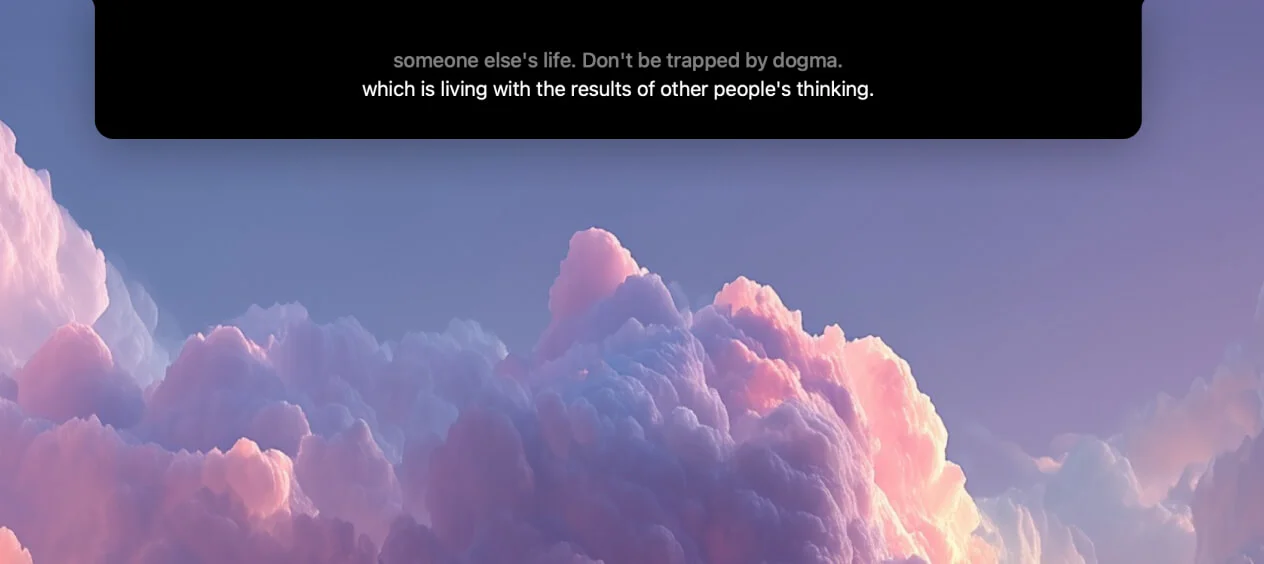
NotchLive takes a fundamentally different approach to live captions on Mac. Instead of a floating window that competes with your workspace, captions appear directly in the MacBook's notch area — the dead space at the top of your display that's otherwise unused. The result is live captions that are always visible but never in the way.
Under the hood, NotchLive runs OpenAI's Whisper AI model entirely on-device, supporting over 90 languages with no internet connection required after model download. Your audio never leaves your Mac. Choose from 6 Whisper model sizes — from Tiny and Small for speed to Large Turbo Compact and Large Turbo for higher accuracy. You can hot-swap models while captioning is running.
Where NotchLive really pulls ahead is its Pro features. Translated speech in 20 languages uses Apple's on-device Translation framework, so you can hear Japanese and read English — or hear English and read Spanish — without any cloud processing. Session recording saves full transcripts with timestamps that you can review, search, and export as TXT, Markdown, or JSON. And the Caption Display window was built specifically for screen sharing: it stays visible during Zoom, Meet, and Teams calls so your audience sees live captions alongside your content.
NotchLive captures both microphone and system audio simultaneously, which means it can caption both sides of a conversation. It runs on macOS 14+ and supports both Apple Silicon and Intel Macs.
Price: Free tier (unlimited captions) + Pro $24.99 one-time
On-device: Yes — 100% private, no cloud
Real-time captions: Yes
Translation: 20 languages (Pro)
Transcript export: Yes (Pro)
Screen sharing captions: Yes (Caption Display)
macOS 14+, Intel supported
2. Apple Live Captions — Best for Zero-Setup Basics
Apple Live Captions is built into macOS and costs nothing. Toggle it on in System Settings > Accessibility > Live Captions and you're done. No downloads, no accounts, no configuration. For casual use, that simplicity is hard to beat.
With macOS Tahoe, Apple significantly improved the accuracy and responsiveness of Live Captions. The new SpeechAnalyzer engine is noticeably better than previous versions, and for straightforward English transcription it's now genuinely competitive with third-party solutions. It works system-wide — FaceTime, Safari, any app that plays audio — with deep OS-level integration that third-party apps can't match.
That said, Apple Live Captions has real limitations. It doesn't translate — you get transcription in the detected language, but no way to read it in your own language. There's no transcript saving; once the audio stops, the captions are gone forever. And it blanks out completely during screen recording with no warning, which is a documented frustration for accessibility users and content creators alike.
Apple Live Captions also requires Apple Silicon. If you're on an Intel Mac, it's not available to you at all.
Price: Free (built into macOS)
On-device: Yes — 100% private
Real-time captions: Yes
Translation: No
Transcript export: No
Screen sharing captions: No (blanks during screen recording)
macOS 13+, Apple Silicon only
3. Otter.ai — Best for Meeting Notes + Collaboration
Otter.ai is a cloud-based AI meeting assistant that auto-joins your Zoom, Google Meet, and Microsoft Teams calls to transcribe, summarize, and generate action items. If your primary need is searchable meeting notes with speaker identification and team collaboration features, Otter is the most polished solution available.
Otter's AI-generated summaries save real time — after a meeting, you get a structured recap with key topics, decisions, and follow-ups without reviewing the full transcript. Speaker identification labels who said what, and the collaborative workspace lets teammates comment on and highlight sections of any transcript.
The trade-off is privacy. Otter is entirely cloud-based: your audio is sent to Otter's servers for processing. For sensitive meetings, regulated industries, or anyone who prefers on-device processing, this is a dealbreaker. There's also the pricing model — Otter's free tier gives you 300 minutes per month, but the Pro plan at $8.33/month (billed annually) adds up over time compared to one-time purchase alternatives.
It's also worth noting that Otter is not a live caption overlay. It's a meeting notetaker that produces transcripts. You won't see real-time captions floating on your screen during a call the way you would with NotchLive or Apple Live Captions.
Price: Free (300 min/month); Pro $8.33/mo (annual)
On-device: No — cloud-based
Real-time captions: In-app only (not a system overlay)
MacWhisper is an excellent tool for transcribing audio and video files. Drag a recording onto the app, pick a Whisper model, and get a high-quality transcript in minutes. It supports 100+ languages, batch processing, and multiple export formats including SRT subtitles.
The key distinction: MacWhisper is not a live caption app. It doesn't listen to your microphone or system audio in real-time. It transcribes pre-recorded files. If you have a folder of meeting recordings, podcast episodes, or lecture videos you need transcribed, MacWhisper is purpose-built for that job and does it well.
Like NotchLive, MacWhisper uses OpenAI's Whisper model and runs entirely on-device. Your files stay on your Mac. The free tier handles basic transcription, while the Pro version ($29.99/year or $79.99 lifetime) unlocks larger models, batch processing, and advanced export options.
Price: Free tier; Pro $29.99/year or $79.99 lifetime
On-device: Yes — 100% private
Real-time captions: No — file transcription only
Translation: No
Transcript export: Yes (TXT, SRT, VTT, CSV, JSON)
Screen sharing captions: N/A
5. SuperWhisper — Best for Voice Dictation
SuperWhisper uses Whisper AI for a completely different purpose: voice-to-text dictation. Press a hotkey, speak, and SuperWhisper types your words directly into whatever app you're using — email, Slack, your code editor, anywhere. It's a replacement for your keyboard, not a caption tool.
SuperWhisper's AI formatting modes are genuinely clever. Depending on the mode you select, it can clean up your speech into formal prose, casual messages, or even code comments. The transcription is fast and accurate, and because it runs Whisper on-device, it works offline with full privacy.
But to be clear: SuperWhisper is not live captions. It doesn't transcribe other people's speech. It doesn't caption your meetings or calls. It listens to you and converts your voice into typed text. If that's what you need, it's great. If you need live captions for meetings, this isn't the tool.
Price: Free (15 min); Pro from $8.49/mo
On-device: Yes — 100% private
Real-time captions: No — voice dictation only
Translation: No
Transcript export: No
Screen sharing captions: N/A
Comparison Table
Feature
NotchLive
Apple Live Captions
Otter.ai
MacWhisper
SuperWhisper
Price
Free + Pro $24.99
Free
Free / $8.33/mo
Free / $29.99/yr
Free / $8.49/mo
On-device
Yes
Yes
No (cloud)
Yes
Yes
Real-time captions
Yes
Yes
In-app only
No
No
Translation
20 languages
No
No
No
No
Transcript export
Yes
No
Yes
Yes
No
Screen sharing captions
Yes
No
No
N/A
N/A
The Verdict
Which app should you use?
NotchLive — for live captions during calls and meetings, especially if you need translation, screen sharing captions, or transcripts. The notch placement keeps captions visible without cluttering your workspace.
Apple Live Captions — for quick, casual captioning when you don't need translation or transcripts. Zero setup, built right into macOS.
Otter.ai — for cloud-powered meeting notes with AI summaries, speaker labels, and team collaboration. Best if your priority is searchable meeting archives.
MacWhisper — for transcribing recorded audio and video files. Not live captions, but the best on-device file transcription tool on Mac.
SuperWhisper — for voice dictation that types into any app. Not live captions — it's a keyboard replacement powered by Whisper AI.
Bottom line: If you need actual live captions on your Mac — real-time speech-to-text during meetings, calls, lectures, or any audio — your real options are NotchLive and Apple Live Captions. NotchLive adds translation, transcripts, screen sharing support, and a non-intrusive notch UI. Apple Live Captions is free and built-in but limited to basic transcription with no export. The other apps on this list are great at what they do, but they solve different problems.
Try NotchLive free
Live captions and translated speech in your MacBook's notch. On-device Whisper AI. 100% private. Free forever — Pro $24.99 one-time.
 NotchLive