 NotchLive
Follow every sentence
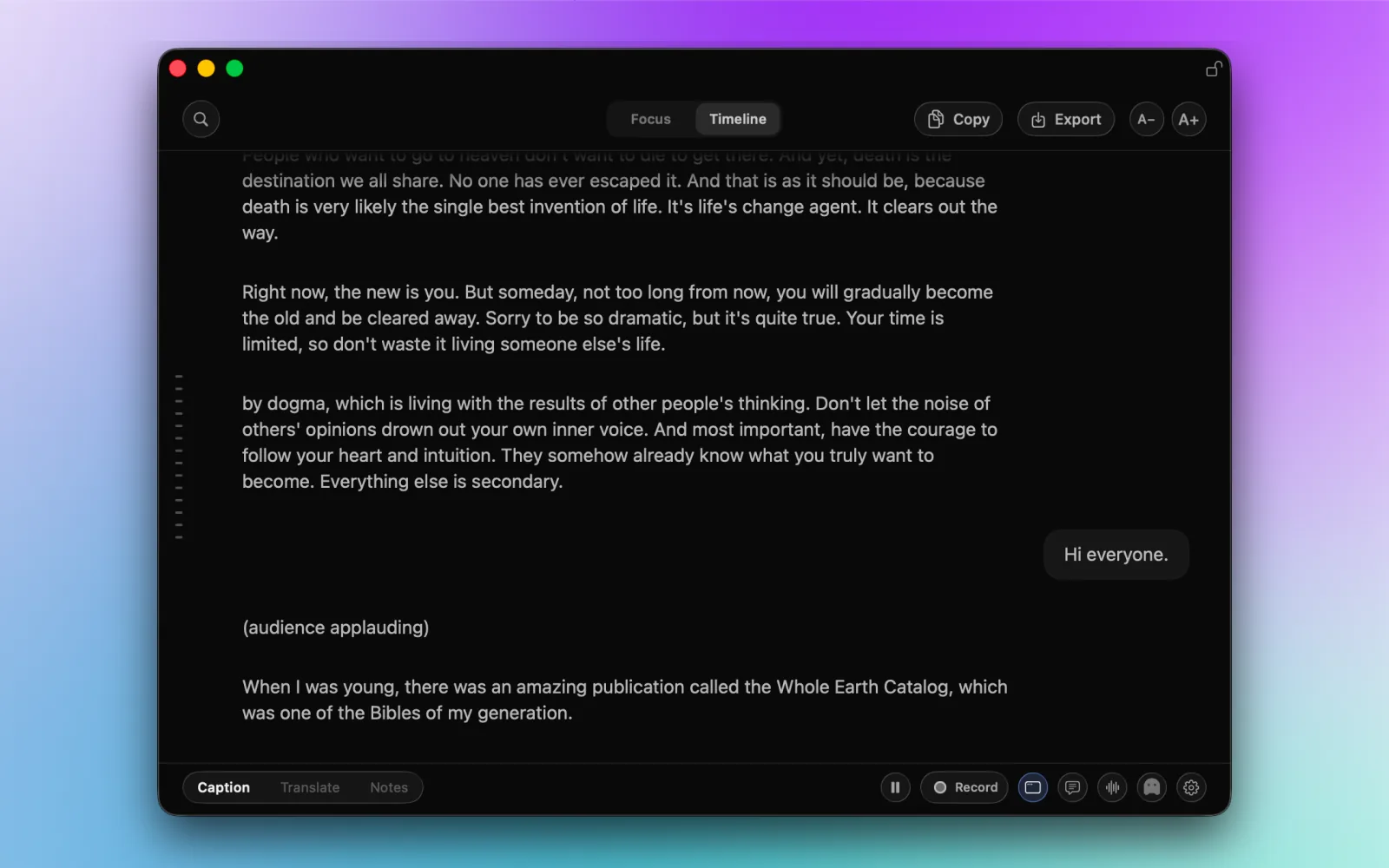
Use live captions across Mac audio, including calls, videos, lectures, podcasts, and microphone speech.
Follow speech live, search recent context, and turn captions into AI meeting notes on your Mac. NotchLive needs no account, cloud transcript workspace, or recurring subscription.
Live captions during the meeting · Optional transcripts · No account · Pro is $24.99 once
After you download a speech model, WhisperKit and Core ML recognize audio locally. Captions can disappear when you stop, or you can save a transcript for later. Read how this works in the NotchLive privacy policy.
| Listen | Choose Mac app audio, microphone speech, or both. |
|---|---|
| Read | See captions while people speak and search recent context. |
| Summarize | Create topics, decisions, action items, and a summary on supported Macs. |
| Keep | Save or export the result when it belongs in your records. |
Post-meeting notes cannot recover a sentence while the discussion is still moving. NotchLive adds a live caption layer first, then gives you the option to create a lasting record.
Use live captions across Mac audio, including calls, videos, lectures, podcasts, and microphone speech.
Scroll or search recent captions in Timeline without stopping new text from arriving.
Save a transcript, export the text, or create structured meeting notes when the conversation matters later.
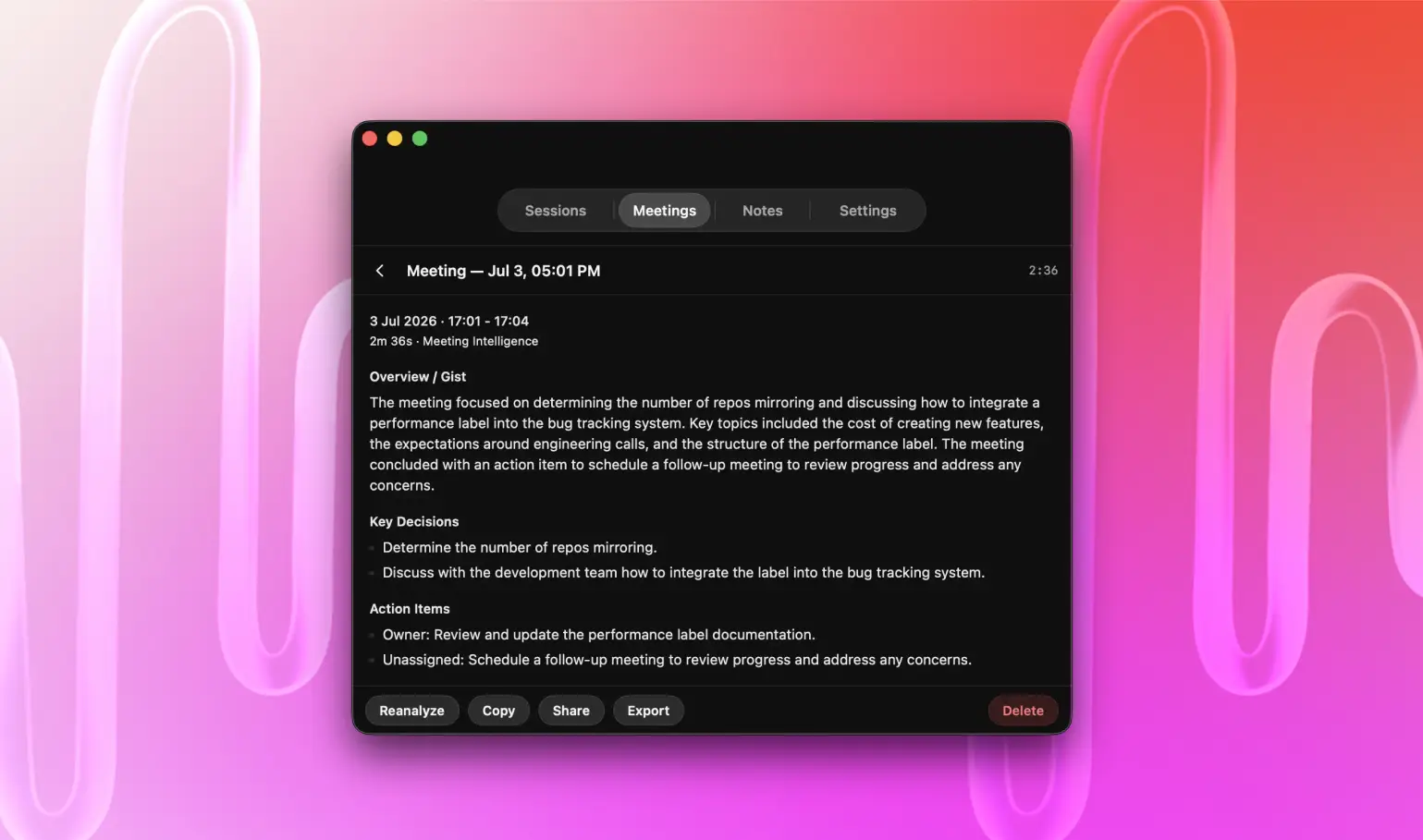
NotchLive helps you understand the conversation first. On supported Macs, it can then turn captured speech into topics, decisions, action items, entities, and a summary.
Choose app audio, microphone speech, or both.
Use Zoom, Meet, Teams, browser media, or other compatible Mac apps.
Follow Focus view or search recent speech in Timeline.
Copy a quote or recover context before the discussion ends.
Use Meeting Intelligence for decisions, action items, entities, and a summary.
Review the transcript and speakers in the NotchLive meeting transcription workflow, or explore every feature.
NotchLive is built for an individual Mac workflow: live captions now, optional notes later, and one-time pricing. See the full Granola AI pricing breakdown and cost calculator.
| What matters | NotchLive | Granola |
|---|---|---|
| During the meeting | Live captions with searchable recent context | Meeting-note workflow built around captured transcripts |
| Speech processing | WhisperKit and Core ML run on your Mac | Uses cloud transcription providers |
| Stored content | Optional local sessions and exports | Transcripts and notes live in a cloud workspace |
| Account requirement | No account required for captioning | Cloud account and workspace |
| Paid individual use | $24.99 once for Pro | Recurring subscription plans |
| Team access | One-time Team Packs for 5, 10, or 25 Macs | Recurring workspace plans |
NotchLive gives Mac users live captions during the conversation, local speech recognition, optional transcripts, and AI meeting notes without a cloud workspace or subscription.
Yes. NotchLive runs WhisperKit and Core ML speech recognition locally on your Mac after model download.
No. You can use NotchLive captions without an account. Live captions are free, and Pro costs $24.99 once.
Yes. On supported Macs, Meeting Intelligence turns captured speech into topics, decisions, action items, entities, and a summary.
Yes. NotchLive shows captions while people speak and keeps recent context in a searchable Timeline, so you do not have to wait for post-meeting notes.
Yes. Team Packs provide one-time licenses for 5, 10, or 25 Mac activations without a recurring per-user subscription.
Start with free live captions. Upgrade once for saved transcripts, translation, Voice Notes, exports, and AI meeting summaries.